Meta (Facebook)
Kixell Tag deploys the Meta Pixel (Facebook / Instagram) on the client side and prepares the data for the Conversions API (CAPI) on the server side. Product identifiers are aligned with your Meta catalog for dynamic remarketing.
Enable the Meta Pixel
- Turn on the Enable the Meta pixel switch.
- Enter your Meta Pixel ID.
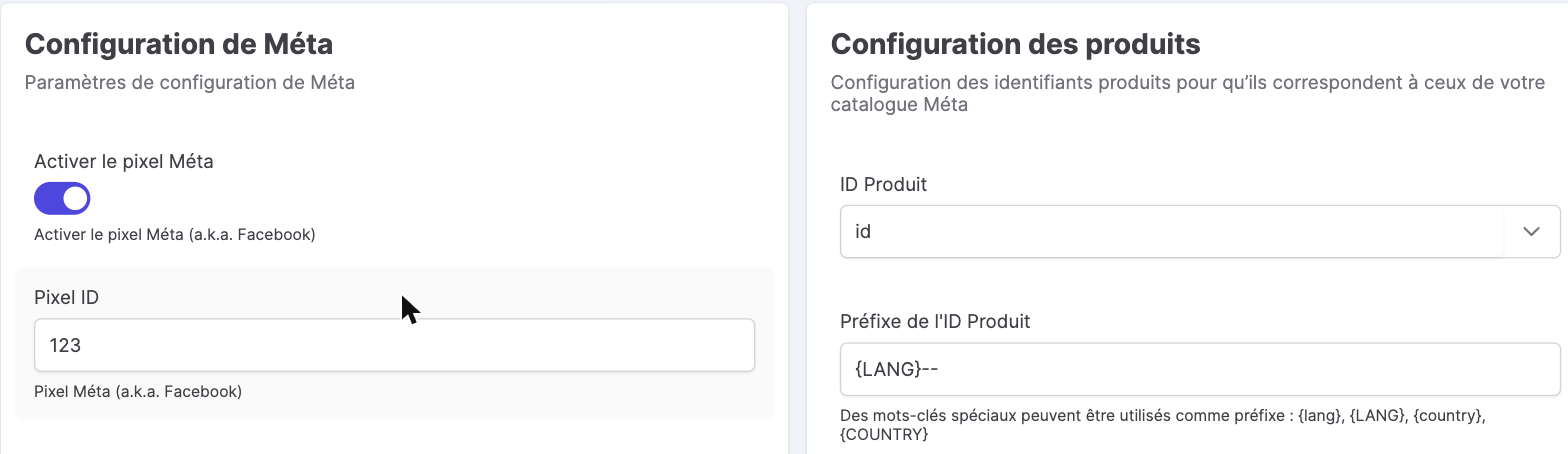
Product configuration
The Product configuration section ensures that the identifiers sent (content_ids) match those of your Meta catalog:
- Product ID: base field (
idor reference). - Prefix / Suffix: with the keywords
{lang},{LANG},{country},{COUNTRY}(for example a{LANG}--prefix). - Add the combination identifier + separator.
Specific events (new / returning buyers)
Meta lets you separate acquisition from retention. The Specific events section defines the custom event names sent to distinguish a new buyer from a returning buyer (for example newBuyer). You can then build distinct audiences and optimizations on the Meta side.
Conversions API (server side)
In addition to the client-side pixel, the Conversions API sends conversions from the server, which improves measurement reliability (cookieless browsers, blockers). It is configured in the GTM Server Side container (Meta API key) — see Server Side GTM Configuration.
Consent
The Meta Pixel is fired only according to the user's consent expressed in the banner. See CMP features.
Meta Pixel, CAPI and performance
The Meta Pixel feeds your Facebook and Instagram campaigns: building audiences (visitors, add-to-cart, buyers), lookalike audiences and Advantage+ Shopping campaigns. Paired with the Conversions API (CAPI), it restores measurement lost to iOS restrictions (ATT) and ad blockers, for more reliable attribution and a better ROAS. The Meta Pixel Helper lets you check that events fire correctly — always while respecting consent.