Kelkoo
Kixell Tag supports Kelkoo sales tracking (Kelkoogroup) to measure conversions from your Kelkoo campaigns.
Enable Kelkoo
- Turn on the Enable Kelkoo tracking switch.
- Enter one or more Merchant ID + Country pairs — one per Kelkoogroup campaign.
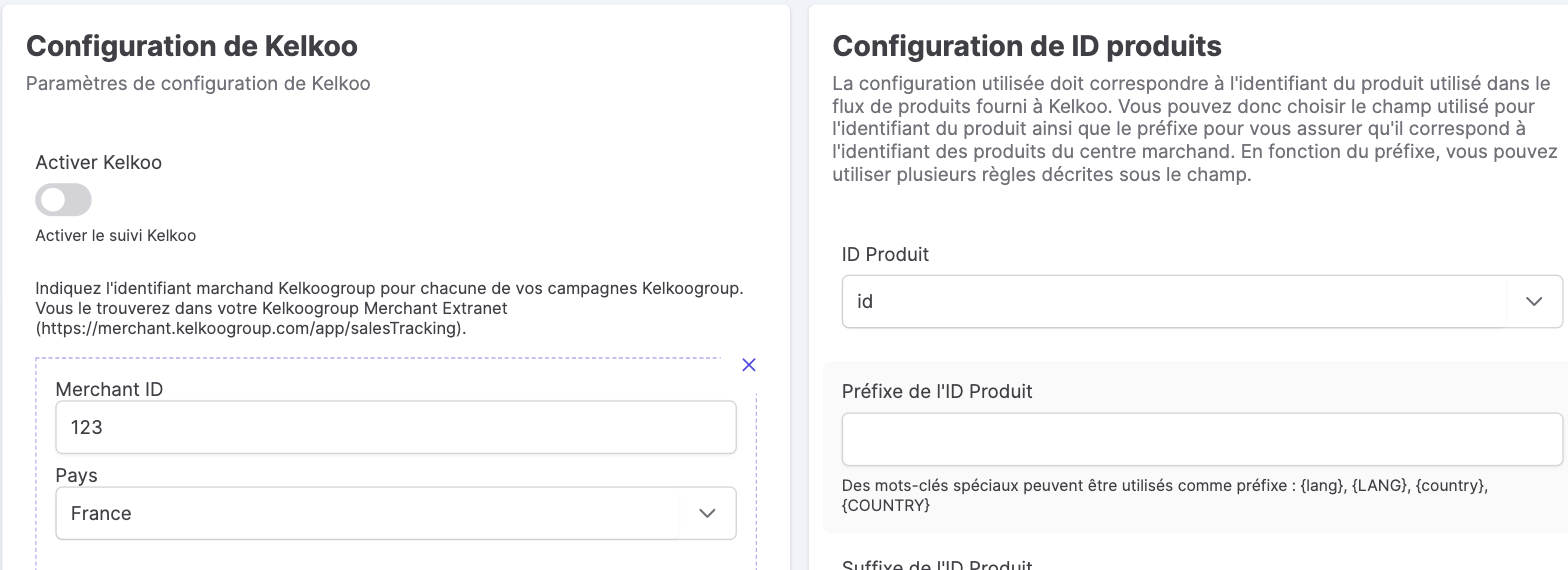
Where to find the Merchant ID? In your Kelkoogroup Merchant Extranet:
https://merchant.kelkoogroup.com/app/salesTracking. You can add as many identifiers as you have campaigns (by country).
Product identifier configuration
The product identifier sent must match the one in the feed provided to Kelkoo:
- Product ID: base field (
idor reference). - Prefix / Suffix: with the keywords
{lang},{LANG},{country},{COUNTRY}.
Consent
Kelkoo tracking is driven by the user's consent choice. See CMP features.
Kelkoo, the price comparison engine
Kelkoo (Kelkoogroup) is a price comparison engine and a shopping acquisition channel: your products are listed there and sales tracking measures the conversions generated, campaign by campaign and country by country. Reliable tracking, fed by Kixell Tag, lets you compute the real ROI of each Kelkoo feed and arbitrate your investments across acquisition channels — while respecting consent.