TikTok
Kixell Tag deploys the TikTok Pixel and aligns your product identifiers with your TikTok catalog to measure conversions and feed remarketing.
Enable TikTok
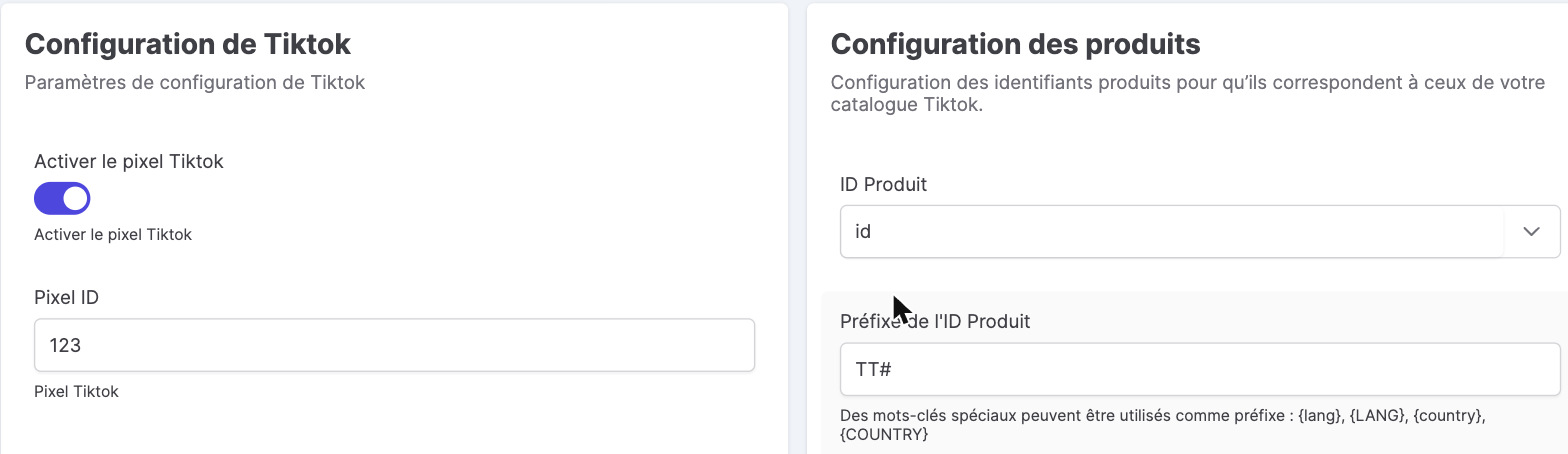
- Turn on the Enable the TikTok pixel switch.
- Enter your TikTok Pixel ID.
Where to find the Pixel ID? In TikTok Ads Manager → Assets → Events → Web Events, open your pixel: its identifier is shown there.
Product configuration
To align tracking with your TikTok catalog, adjust the product identifier sent:
- Product ID: base field (
idor reference). - Prefix / Suffix: with the keywords
{lang},{LANG},{country},{COUNTRY}(for example aTT#prefix). - Add the combination identifier + separator.
Consent
The TikTok Pixel is fired only after the user agrees in the consent banner. See CMP features.
TikTok Ads and conversion tracking
The TikTok Pixel connects your store to TikTok Ads Manager to measure conversions and optimize your campaigns to a young, engaged audience. Combined with the Events API (server side), it makes attribution more reliable despite the disappearance of third-party cookies. The e-commerce events reported by Kixell Tag let you build retargeting audiences and feed dynamic remarketing from your catalog — while respecting consent.